Choose capacity and topology
Choose an initial platform configuration based on the workload you are deploying.
The Marketplace plan determines which workload profiles, capacities, and topologies are available.
The initial configuration can be reviewed after deployment using actual platform usage and capacity data.
Choose the workload
Select the primary workload.
| Workload | Use when |
|---|---|
| Search | The platform is primarily used for application, document, knowledge, vector, or other search workloads |
| Observability | The platform is primarily used for logs, metrics, traces, and operational analytics |
The workload selection determines which topology and capacity options are available in Marketplace.
Choose the initial capacity
Select the initial capacity offered by the Marketplace plan.
| Capacity | Planning range | Typical starting point |
|---|---|---|
| Small | Up to 100 GB/day ingest and up to 2 TB stored | Lower-volume or initial workloads |
| Medium | 100–500 GB/day ingest and up to 10 TB stored | Growing or moderate workloads |
| Large | 500 GB/day or more ingest and more than 10 TB stored | Higher-volume workloads |
These ranges are intended as initial planning guidance only. Actual capacity depends on data shape, retention, replicas, query activity, integrations, and workload behavior.
The size labels are not performance or service-level guarantees.
You do not need to predict the final platform size before deployment. Start with the capacity closest to the expected workload and review actual health and usage after the platform is running.
Understand the Elasticsearch node roles
The available topologies use different Elasticsearch node roles.
- Master nodes manage cluster state and cluster-level operations.
- Data nodes store data and process indexing and search requests.
- Hot data nodes hold recent or frequently accessed data.
- Warm data nodes hold older, less frequently accessed data for longer retention.
- Machine-learning nodes run supported machine-learning and inference workloads when enabled.
The Marketplace topology determines how these roles are grouped or separated.
Choose the topology
Select one of the topology options available for the selected workload and Marketplace plan.
All-in-one
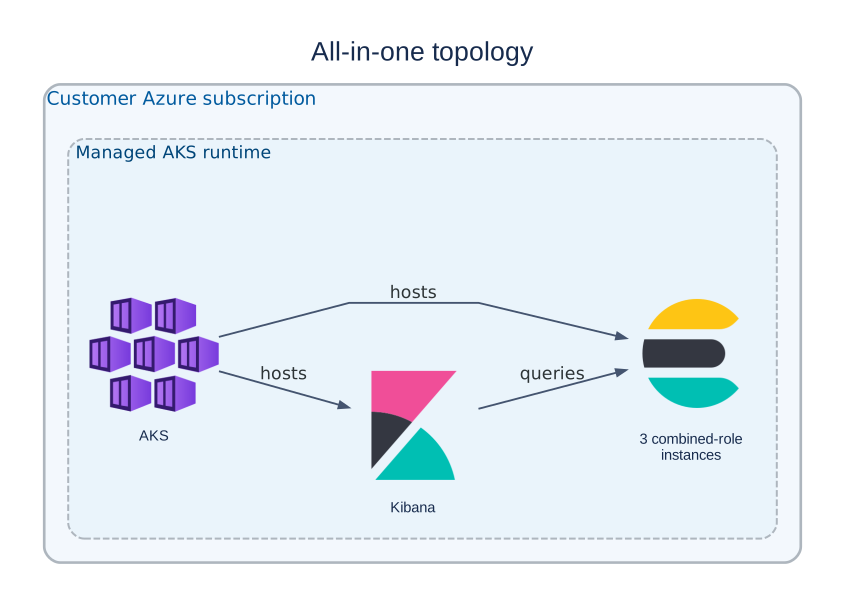
Elasticsearch roles are combined on the same instances.
Use this topology only for trial or evaluation deployments.
It is intended for:
- trials and proof-of-concept deployments;
- short-term evaluation;
- functional testing;
- learning and initial platform validation.
Do not use the All-in-one topology for production workloads.
For production deployments, use one of the supported role-separated topologies available in the Marketplace plan.
Dedicated master and data
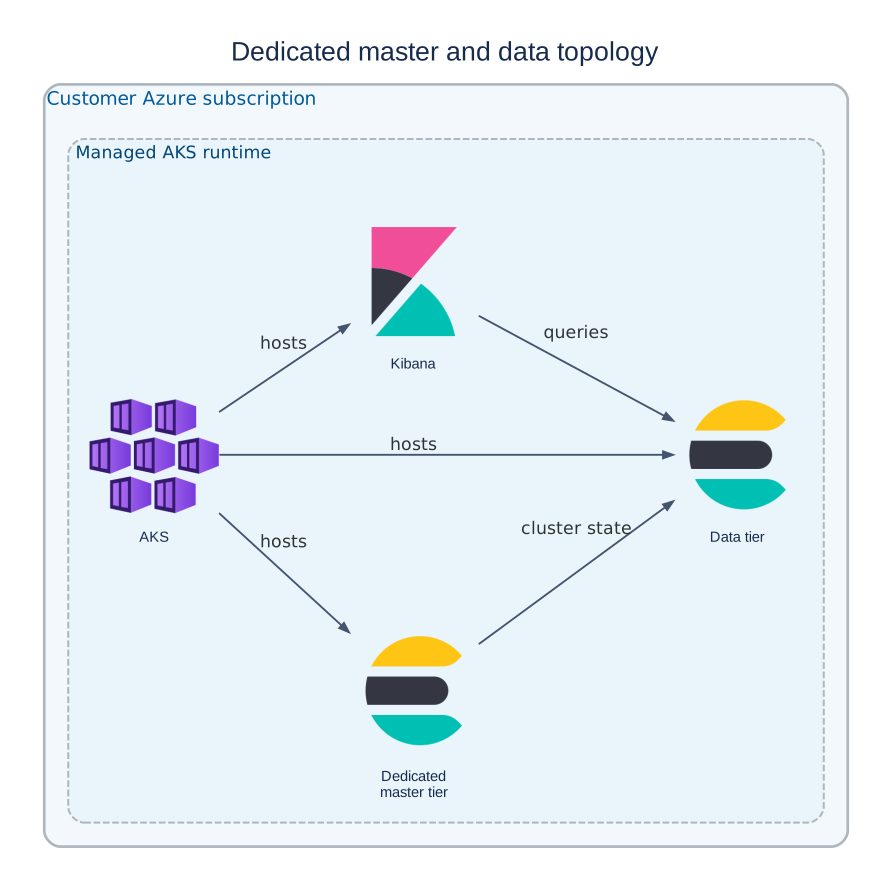
Master nodes are separated from the data nodes that handle indexing, storage, and search workloads.
Use this topology when:
- the workload is larger or growing;
- search or ingestion activity is more demanding;
- you want cluster-management activity separated from data workloads;
- you expect to scale data capacity independently.
This topology is a good general-purpose choice for production Search or Observability deployments where role separation provides better scalability and operational stability.
Dedicated master, hot, and warm
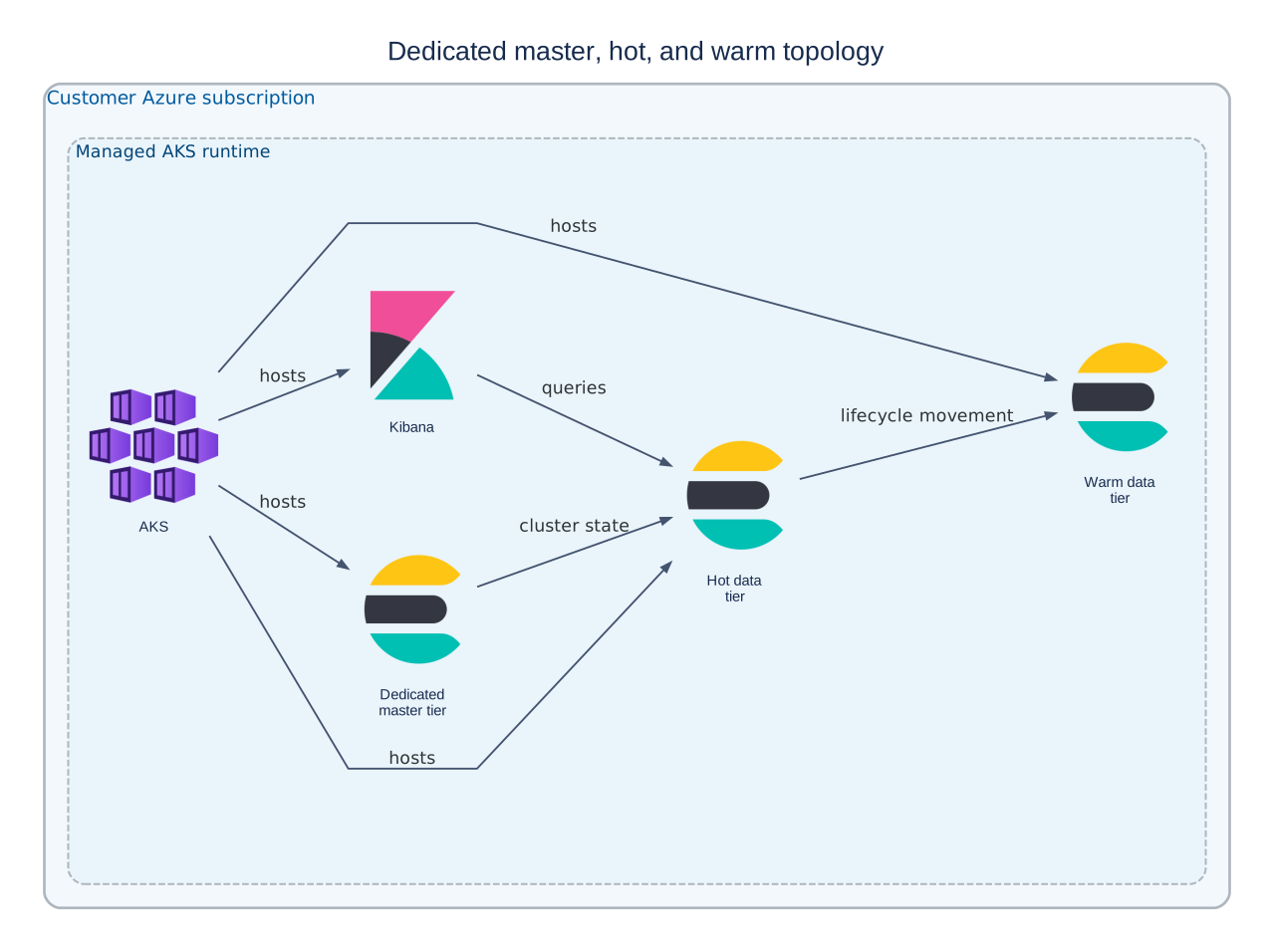
Master nodes are separated from hot and warm data tiers. Recent or frequently accessed data is kept on the hot tier, while older data can move to the warm tier.
Use this topology when:
- you are deploying an Observability workload;
- you ingest data continuously;
- recent data is queried more frequently than older data;
- you need longer retention without keeping all data on the highest-performance tier;
- you want lifecycle policies to move older data from hot to warm storage.
This topology is typically the best fit for larger observability environments with continuous ingestion and longer retention.
Only topologies displayed by the Marketplace plan are supported for the deployment.
Optional machine-learning capacity
Some plans can expose optional machine-learning capacity.
Enable it when the workload requires supported Elastic machine-learning, inference, or AI capabilities.
Feature availability also depends on the deployed Elastic version and license.
Select the initial configuration
Before deployment:
- Choose Search or Observability.
- Choose an initial Small, Medium, or Large capacity.
- Select one of the topology options available in Marketplace.
- Enable optional machine-learning capacity only when required.
The Marketplace form is authoritative for the options available to the selected plan.
After deployment
Monitor actual platform usage rather than trying to fully size the deployment in advance.
Review:
- Elasticsearch health;
- storage usage;
- ingestion growth;
- platform resource utilization.
If additional capacity is required, request a capacity review through the supported iVedha workflow.
See monitor health and capacity.
Return to the planning overview, or continue to plan connectivity.